01Install Steam

Download and install the client from the Steam website, then create an account.
New to HavFun? We'll walk you through everything from installing Steam to playing games, quickly and easily.

Download and install the client from the Steam website, then create an account.

Search for HavFun in the Steam store, or use the store page button.

Click 'Play Game' on the store page to add it to your library and install it.

Launch the game and sign in to save your progress. Chips and items stay in HavFun on Steam.

Pick a game and start playing right now!

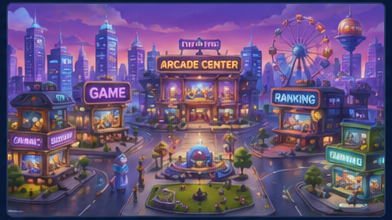
Head to the Arcade Center for slots, blackjack and roulette — or pick a mini-game.

Each game opens with a short tutorial that explains the rules.

Aim for a high score, climb the rankings and try every game.

Casino games are played with virtual chips that have no cash value and cannot be cashed out.
Optimized for mouse and keyboard on PC.
The Arcade Center is the social casino area of HavFun. It is for adults only and exists purely for entertainment.
Themed slot machines with free spins and bonus rounds.
The classic card game of 21 — hit or stand at your own pace.
Choose your numbers and colors, then watch the wheel spin.
All Arcade Center games are for entertainment only and are intended for adults (18+ or the legal gambling age where you live, if higher). Chips and in-game items are virtual: they have no cash value and cannot be exchanged, transferred or redeemed for real money or prizes. Practice or success at social casino gaming does not imply future success at real-money gambling.
HavFun is only for players 18 or older, or the legal gambling age where you live if that is higher.
No real-money gambling and no prizes of real-world value. Chips can never be cashed out.
Take breaks and set limits on your time and spending. Steam's account and family settings can help.
National Problem Gambling Helpline: 1-800-MY-RESET (1-800-697-3738).
Only adults. You must be at least 18 years old, or the legal gambling age where you live if that is higher. HavFun is not intended for minors and is not available in the State of Washington.
HavFun is available on Steam. Search for HavFun in the Steam store, or use the 'Download on Steam' button on this site to go straight to the store page.
No. HavFun does not offer real-money gambling or an opportunity to win real money or prizes of real-world value. HavFun contains in-game purchases, but virtual chips and items have no cash value and cannot be exchanged, transferred or redeemed.
No. HavFun is not available in the State of Washington. It is not offered on Steam there, and access to the game servers from Washington is blocked.
HavFun on Steam is available in English, Korean, Spanish, French, German and Japanese.
Your progress is safely saved to your HavFun on Steam account. Chips and items in HavFun on Steam are separate from other HavFun apps and cannot be shared or transferred.
Update your graphics driver to the latest version and restart Steam. If the problem persists, right-click HavFun in your Steam library → Properties → run 'Verify integrity of game files'.